---
title: ultravox-cn
canonical_url: "https://www.modelscope.cn/models/seanzhang/ultravox-cn"
md_url: "https://www.modelscope.cn/models/seanzhang/ultravox-cn.md"
repository: seanzhang/ultravox-cn
last_updated: 2025-04-13
pipeline_tag: multimodal-dialogue
tasks:
- multimodal-dialogue
model_type:
- ultravox
architectures:
- UltravoxModel
parameters: 49.3M
tensor_type:
- BF16
library_name:
- safetensors
- pytorch
frameworks:
- Pytorch
inference_backends:
- "deploy_task text/emb/vlm"
- "vllm 0.9.2"
downloads: 77
stars: 4
---
# ultravox-cn
> ultravox-cn - seanzhang 在 ModelScope 开源的模型。一款为实时语音交互设计的快速多模态LLM
seanzhang/ultravox-cn 是 ModelScope 魔搭社区上的 49.3M 参数multimodal-dialogue模型,可用 deploy_task text/emb/vlm、vllm 0.9.2 部署。
- **Repository**: seanzhang/ultravox-cn
- **Tasks**: multimodal-dialogue
- **Parameters**: 49.3M
- **Inference backends**: deploy_task text/emb/vlm, vllm 0.9.2
- **Downloads**: 77
- **Stars**: 4
- **Last updated**: 2025-04-13
Source: https://www.modelscope.cn/models/seanzhang/ultravox-cn
---
中文 | [English](README_EN.md)

一款为实时语音交互设计的快速多模态LLM
# 概述
Ultravox是一种新型的多模态LLM,能够理解文本和人类语音,无需单独的自动语音识别(ASR)阶段。基于[AudioLM](https://arxiv.org/abs/2209.03143)、[SeamlessM4T](https://ai.meta.com/blog/seamless-m4t/)、[Gazelle](https://tincans.ai/slm)、[SpeechGPT](https://github.com/0nutation/SpeechGPT/tree/main/speechgpt)等研究,Ultravox能够将任何开放权重LLM扩展为一个多模态投影器,直接将音频转换为LLM使用的高维空间。
ultravox官方仓库:[https://github.com/fixie-ai/ultravox](https://github.com/fixie-ai/ultravox)
ultravox-cn仓库:[https://github.com/seanzhang-zhichen/ultravox-cn](https://github.com/seanzhang-zhichen/ultravox-cn)
由于官方版本模型对中文支持较差,因此,我们训练了基于Qwen2.5-7B-Instruct和whisper-large-v3-turbo的中文友好的语音多模态模型
### 架构
[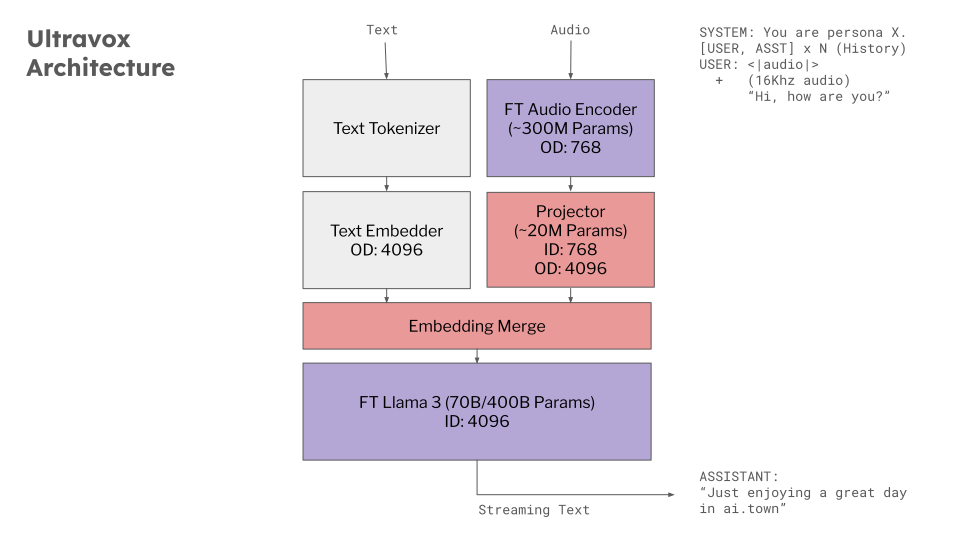](https://docs.google.com/presentation/d/1ey81xuuMzrJaBwztb_Rq24Cit37GQokD2aAes_KkGVI/edit)
### 效果

### 模型
- Huggingface下载地址:[https://huggingface.co/zhichen/ultravox-cn](https://huggingface.co/zhichen/ultravox-cn)
- Modelscope下载地址:[https://modelscope.cn/models/seanzhang/ultravox-cn](https://modelscope.cn/models/seanzhang/ultravox-cn)
## 环境设置
安装`just`
```bash
git clone https://github.com/seanzhang-zhichen/ultravox-cn.git
cd ultravox-cn
sudo apt-get install just
conda create -n ultravox python=3.11
conda activate ultravox
just install
```
## 模型准备
运行demo前,需准备以下模型:
- Qwen2.5-7B-Instruct
- whisper-large-v3-turbo
- seanzhang/ultravox-cn
以上模型准备好后,修改seanzhang/ultravox-cn/config.json中的audio_model_id为本地whisper-large-v3-turbo路径,text_model_id为本地Qwen2.5-7B-Instruct路径。

### Web Demo
```bash
python ultravox/tools/gradio_demo.py --model_path seanzhang/ultravox-cn(或本地路径)
```