---
title: MiniCPM-V-2_6
canonical_url: "https://www.modelscope.cn/models/openbmb/MiniCPM-V-2_6"
md_url: "https://www.modelscope.cn/models/openbmb/MiniCPM-V-2_6.md"
repository: openbmb/MiniCPM-V-2_6
last_updated: 2025-06-15
pipeline_tag: image-text-to-text
tasks:
- image-text-to-text
model_type:
- minicpmv
architectures:
- MiniCPMV
parameters: 8.1B
tensor_type:
- BF16
library_name:
- pytorch
- transformer
- safetensors
frameworks:
- Pytorch
language:
- multilingual
inference_backends:
- "deploy_task vlm/text/emb"
- "lmdeploy_turbomind 0.9.1"
- "sglang 0.5.2"
- "vllm 0.9.2"
downloads: 780134
stars: 120
tags:
- minicpm-v
- vision
- ocr
- multi-image
- video
- custom_code
---
# MiniCPM-V-2_6
> MiniCPM-V-2_6 - openbmb 在 ModelScope 开源的模型。A GPT-4V Level MLLM for Single Image, Multi Image and Video on Your Phone
openbmb/MiniCPM-V-2_6 是 ModelScope 魔搭社区上的 8.1B 参数image-text-to-text模型,可用 deploy_task vlm/text/emb、lmdeploy_turbomind 0.9.1、sglang 0.5.2 部署。
- **Repository**: openbmb/MiniCPM-V-2_6
- **Tasks**: image-text-to-text
- **Parameters**: 8.1B
- **Inference backends**: deploy_task vlm/text/emb, lmdeploy_turbomind 0.9.1, sglang 0.5.2, vllm 0.9.2
- **Tags**: minicpm-v, vision, ocr, multi-image, video, custom_code
- **Downloads**: 780134
- **Stars**: 120
- **Last updated**: 2025-06-15
Source: https://www.modelscope.cn/models/openbmb/MiniCPM-V-2_6
---
A GPT-4V Level MLLM for Single Image, Multi Image and Video on Your Phone
[GitHub](https://github.com/OpenBMB/MiniCPM-V) | [Demo](http://120.92.209.146:8887/)
## News
* [2025.01.14] 🔥🔥 We open source [**MiniCPM-o 2.6**](https://huggingface.co/openbmb/MiniCPM-o-2_6), with significant performance improvement over **MiniCPM-V 2.6**, and support real-time speech-to-speech conversation and multimodal live streaming. Try it now.
## MiniCPM-V 2.6
**MiniCPM-V 2.6** is the latest and most capable model in the MiniCPM-V series. The model is built on SigLip-400M and Qwen2-7B with a total of 8B parameters. It exhibits a significant performance improvement over MiniCPM-Llama3-V 2.5, and introduces new features for multi-image and video understanding. Notable features of MiniCPM-V 2.6 include:
- 🔥 **Leading Performance.**
MiniCPM-V 2.6 achieves an average score of 65.2 on the latest version of OpenCompass, a comprehensive evaluation over 8 popular benchmarks. **With only 8B parameters, it surpasses widely used proprietary models like GPT-4o mini, GPT-4V, Gemini 1.5 Pro, and Claude 3.5 Sonnet** for single image understanding.
- 🖼️ **Multi Image Understanding and In-context Learning.** MiniCPM-V 2.6 can also perform **conversation and reasoning over multiple images**. It achieves **state-of-the-art performance** on popular multi-image benchmarks such as Mantis-Eval, BLINK, Mathverse mv and Sciverse mv, and also shows promising in-context learning capability.
- 🎬 **Video Understanding.** MiniCPM-V 2.6 can also **accept video inputs**, performing conversation and providing dense captions for spatial-temporal information. It outperforms **GPT-4V, Claude 3.5 Sonnet and LLaVA-NeXT-Video-34B** on Video-MME with/without subtitles.
- 💪 **Strong OCR Capability and Others.**
MiniCPM-V 2.6 can process images with any aspect ratio and up to 1.8 million pixels (e.g., 1344x1344). It achieves **state-of-the-art performance on OCRBench, surpassing proprietary models such as GPT-4o, GPT-4V, and Gemini 1.5 Pro**.
Based on the the latest [RLAIF-V](https://github.com/RLHF-V/RLAIF-V/) and [VisCPM](https://github.com/OpenBMB/VisCPM) techniques, it features **trustworthy behaviors**, with significantly lower hallucination rates than GPT-4o and GPT-4V on Object HalBench, and supports **multilingual capabilities** on English, Chinese, German, French, Italian, Korean, etc.
- 🚀 **Superior Efficiency.**
In addition to its friendly size, MiniCPM-V 2.6 also shows **state-of-the-art token density** (i.e., number of pixels encoded into each visual token). **It produces only 640 tokens when processing a 1.8M pixel image, which is 75% fewer than most models**. This directly improves the inference speed, first-token latency, memory usage, and power consumption. As a result, MiniCPM-V 2.6 can efficiently support **real-time video understanding** on end-side devices such as iPad.
- 💫 **Easy Usage.**
MiniCPM-V 2.6 can be easily used in various ways: (1) [llama.cpp](https://github.com/OpenBMB/llama.cpp/blob/minicpmv-main/examples/llava/README-minicpmv2.6.md) and [ollama](https://github.com/OpenBMB/ollama/tree/minicpm-v2.6) support for efficient CPU inference on local devices, (2) [int4](https://huggingface.co/openbmb/MiniCPM-V-2_6-int4) and [GGUF](https://huggingface.co/openbmb/MiniCPM-V-2_6-gguf) format quantized models in 16 sizes, (3) [vLLM](https://github.com/OpenBMB/MiniCPM-V/tree/main?tab=readme-ov-file#inference-with-vllm) support for high-throughput and memory-efficient inference, (4) fine-tuning on new domains and tasks, (5) quick local WebUI demo setup with [Gradio](https://github.com/OpenBMB/MiniCPM-V/tree/main?tab=readme-ov-file#chat-with-our-demo-on-gradio) and (6) online web [demo](http://120.92.209.146:8887).
### Evaluation
#### Single image results on OpenCompass, MME, MMVet, OCRBench, MMMU, MathVista, MMB, AI2D, TextVQA, DocVQA, HallusionBench, Object HalBench:

* We evaluate this benchmark using chain-of-thought prompting.
+ Token Density: number of pixels encoded into each visual token at maximum resolution, i.e., # pixels at maximum resolution / # visual tokens.
Note: For proprietary models, we calculate token density based on the image encoding charging strategy defined in the official API documentation, which provides an upper-bound estimation.
#### Multi-image results on Mantis Eval, BLINK Val, Mathverse mv, Sciverse mv, MIRB:
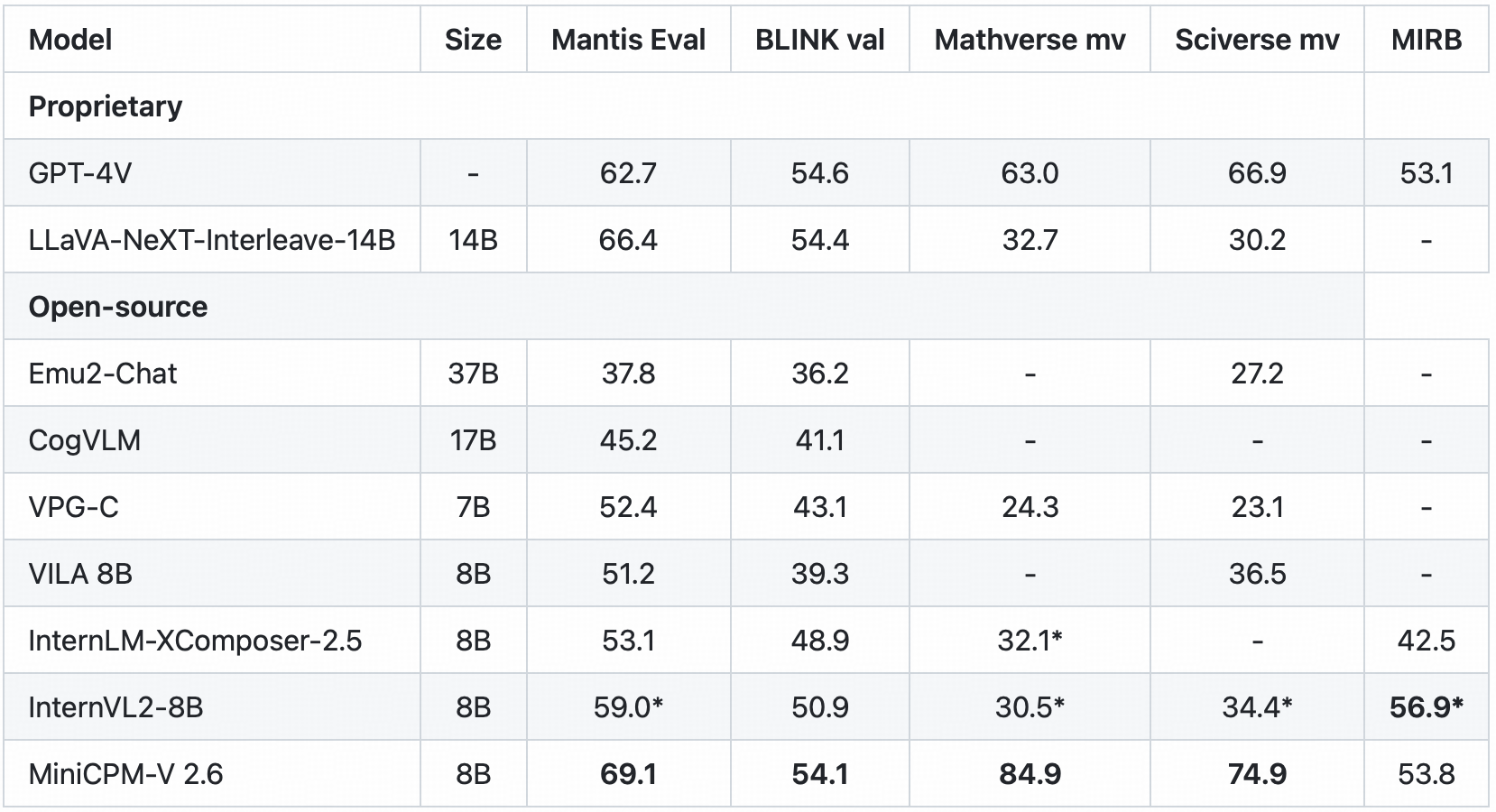
* We evaluate the officially released checkpoint by ourselves.
#### Video results on Video-MME and Video-ChatGPT:

Click to view few-shot results on TextVQA, VizWiz, VQAv2, OK-VQA.

* denotes zero image shot and two additional text shots following Flamingo.
+ We evaluate the pretraining ckpt without SFT.
### Examples
Click to view more cases.
We deploy MiniCPM-V 2.6 on end devices. The demo video is the raw screen recording on a iPad Pro without edition.
## Demo
Click here to try the Demo of [MiniCPM-V 2.6](http://120.92.209.146:8887/).
## Usage
Inference using Huggingface transformers on NVIDIA GPUs. Requirements tested on python 3.10:
```
Pillow==10.1.0
torch==2.1.2
torchvision==0.16.2
transformers==4.40.0
sentencepiece==0.1.99
decord
```
```python
# test.py
import torch
from PIL import Image
from transformers import AutoModel, AutoTokenizer
model = AutoModel.from_pretrained('openbmb/MiniCPM-V-2_6', trust_remote_code=True,
attn_implementation='sdpa', torch_dtype=torch.bfloat16) # sdpa or flash_attention_2, no eager
model = model.eval().cuda()
tokenizer = AutoTokenizer.from_pretrained('openbmb/MiniCPM-V-2_6', trust_remote_code=True)
image = Image.open('xx.jpg').convert('RGB')
question = 'What is in the image?'
msgs = [{'role': 'user', 'content': [image, question]}]
res = model.chat(
image=None,
msgs=msgs,
tokenizer=tokenizer
)
print(res)
## if you want to use streaming, please make sure sampling=True and stream=True
## the model.chat will return a generator
res = model.chat(
image=None,
msgs=msgs,
tokenizer=tokenizer,
sampling=True,
stream=True
)
generated_text = ""
for new_text in res:
generated_text += new_text
print(new_text, flush=True, end='')
```
### Chat with multiple images
Click to show Python code running MiniCPM-V 2.6 with multiple images input.
```python
import torch
from PIL import Image
from transformers import AutoModel, AutoTokenizer
model = AutoModel.from_pretrained('openbmb/MiniCPM-V-2_6', trust_remote_code=True,
attn_implementation='sdpa', torch_dtype=torch.bfloat16) # sdpa or flash_attention_2, no eager
model = model.eval().cuda()
tokenizer = AutoTokenizer.from_pretrained('openbmb/MiniCPM-V-2_6', trust_remote_code=True)
image1 = Image.open('image1.jpg').convert('RGB')
image2 = Image.open('image2.jpg').convert('RGB')
question = 'Compare image 1 and image 2, tell me about the differences between image 1 and image 2.'
msgs = [{'role': 'user', 'content': [image1, image2, question]}]
answer = model.chat(
image=None,
msgs=msgs,
tokenizer=tokenizer
)
print(answer)
```
### In-context few-shot learning
Click to view Python code running MiniCPM-V 2.6 with few-shot input.
```python
import torch
from PIL import Image
from transformers import AutoModel, AutoTokenizer
model = AutoModel.from_pretrained('openbmb/MiniCPM-V-2_6', trust_remote_code=True,
attn_implementation='sdpa', torch_dtype=torch.bfloat16) # sdpa or flash_attention_2, no eager
model = model.eval().cuda()
tokenizer = AutoTokenizer.from_pretrained('openbmb/MiniCPM-V-2_6', trust_remote_code=True)
question = "production date"
image1 = Image.open('example1.jpg').convert('RGB')
answer1 = "2023.08.04"
image2 = Image.open('example2.jpg').convert('RGB')
answer2 = "2007.04.24"
image_test = Image.open('test.jpg').convert('RGB')
msgs = [
{'role': 'user', 'content': [image1, question]}, {'role': 'assistant', 'content': [answer1]},
{'role': 'user', 'content': [image2, question]}, {'role': 'assistant', 'content': [answer2]},
{'role': 'user', 'content': [image_test, question]}
]
answer = model.chat(
image=None,
msgs=msgs,
tokenizer=tokenizer
)
print(answer)
```
### Chat with video
Click to view Python code running MiniCPM-V 2.6 with video input.
```python
import torch
from PIL import Image
from transformers import AutoModel, AutoTokenizer
from decord import VideoReader, cpu # pip install decord
model = AutoModel.from_pretrained('openbmb/MiniCPM-V-2_6', trust_remote_code=True,
attn_implementation='sdpa', torch_dtype=torch.bfloat16) # sdpa or flash_attention_2, no eager
model = model.eval().cuda()
tokenizer = AutoTokenizer.from_pretrained('openbmb/MiniCPM-V-2_6', trust_remote_code=True)
MAX_NUM_FRAMES=64 # if cuda OOM set a smaller number
def encode_video(video_path):
def uniform_sample(l, n):
gap = len(l) / n
idxs = [int(i * gap + gap / 2) for i in range(n)]
return [l[i] for i in idxs]
vr = VideoReader(video_path, ctx=cpu(0))
sample_fps = round(vr.get_avg_fps() / 1) # FPS
frame_idx = [i for i in range(0, len(vr), sample_fps)]
if len(frame_idx) > MAX_NUM_FRAMES:
frame_idx = uniform_sample(frame_idx, MAX_NUM_FRAMES)
frames = vr.get_batch(frame_idx).asnumpy()
frames = [Image.fromarray(v.astype('uint8')) for v in frames]
print('num frames:', len(frames))
return frames
video_path ="video_test.mp4"
frames = encode_video(video_path)
question = "Describe the video"
msgs = [
{'role': 'user', 'content': frames + [question]},
]
# Set decode params for video
params={}
params["use_image_id"] = False
params["max_slice_nums"] = 2 # use 1 if cuda OOM and video resolution > 448*448
answer = model.chat(
image=None,
msgs=msgs,
tokenizer=tokenizer,
**params
)
print(answer)
```
Please look at [GitHub](https://github.com/OpenBMB/MiniCPM-V) for more detail about usage.
## Inference with llama.cpp
MiniCPM-V 2.6 can run with llama.cpp. See our fork of [llama.cpp](https://github.com/OpenBMB/llama.cpp/tree/minicpm-v2.5/examples/minicpmv) for more detail.
## Int4 quantized version
Download the int4 quantized version for lower GPU memory (7GB) usage: [MiniCPM-V-2_6-int4](https://huggingface.co/openbmb/MiniCPM-V-2_6-int4).
## License
#### Model License
* The code in this repo is released under the [Apache-2.0](https://github.com/OpenBMB/MiniCPM/blob/main/LICENSE) License.
* The usage of MiniCPM-V series model weights must strictly follow [MiniCPM Model License.md](https://github.com/OpenBMB/MiniCPM/blob/main/MiniCPM%20Model%20License.md).
* The models and weights of MiniCPM are completely free for academic research. After filling out a ["questionnaire"](https://modelbest.feishu.cn/share/base/form/shrcnpV5ZT9EJ6xYjh3Kx0J6v8g) for registration, MiniCPM-V 2.6 weights are also available for free commercial use.
#### Statement
* As an LMM, MiniCPM-V 2.6 generates contents by learning a large mount of multimodal corpora, but it cannot comprehend, express personal opinions or make value judgement. Anything generated by MiniCPM-V 2.6 does not represent the views and positions of the model developers
* We will not be liable for any problems arising from the use of the MinCPM-V models, including but not limited to data security issues, risk of public opinion, or any risks and problems arising from the misdirection, misuse, dissemination or misuse of the model.
## Key Techniques and Other Multimodal Projects
👏 Welcome to explore key techniques of MiniCPM-V 2.6 and other multimodal projects of our team:
[VisCPM](https://github.com/OpenBMB/VisCPM/tree/main) | [RLHF-V](https://github.com/RLHF-V/RLHF-V) | [LLaVA-UHD](https://github.com/thunlp/LLaVA-UHD) | [RLAIF-V](https://github.com/RLHF-V/RLAIF-V)
## Citation
If you find our work helpful, please consider citing our papers 📝 and liking this project ❤️!
```bib
@article{yao2024minicpm,
title={MiniCPM-V: A GPT-4V Level MLLM on Your Phone},
author={Yao, Yuan and Yu, Tianyu and Zhang, Ao and Wang, Chongyi and Cui, Junbo and Zhu, Hongji and Cai, Tianchi and Li, Haoyu and Zhao, Weilin and He, Zhihui and others},
journal={arXiv preprint arXiv:2408.01800},
year={2024}
}
```


