---
title: CogVideoX-Fun-V1.1-5b-InP
canonical_url: "https://www.modelscope.cn/models/PAI/CogVideoX-Fun-V1.1-5b-InP"
md_url: "https://www.modelscope.cn/models/PAI/CogVideoX-Fun-V1.1-5b-InP.md"
repository: PAI/CogVideoX-Fun-V1.1-5b-InP
last_updated: 2025-12-11
license: other
pipeline_tag: text-to-video-synthesis
tasks:
- text-to-video-synthesis
parameters: 10.5B
tensor_type:
- BF16
library_name:
- safetensors
- diffusers
- pytorch
frameworks:
- Pytorch
downloads: 1951
stars: 3
---
# CogVideoX-Fun-V1.1-5b-InP
> CogVideoX-Fun-V1.1-5b-InP - PAI 在 ModelScope 开源的模型。目录 目录 简介 快速启动 视频作品 如何使用 模型地址 未来计划 参考文献 许可证
PAI/CogVideoX-Fun-V1.1-5b-InP 是 ModelScope 魔搭社区上的 10.5B 参数text-to-video-synthesis模型,采用 other 许可。
- **Repository**: PAI/CogVideoX-Fun-V1.1-5b-InP
- **License**: other
- **Tasks**: text-to-video-synthesis
- **Parameters**: 10.5B
- **Downloads**: 1951
- **Stars**: 3
- **Last updated**: 2025-12-11
Source: https://www.modelscope.cn/models/PAI/CogVideoX-Fun-V1.1-5b-InP
---
# CogVideoX-Fun
😊 Welcome!
[](https://huggingface.co/spaces/alibaba-pai/CogVideoX-Fun-5b)
[English](./README_en.md) | 简体中文
# 目录
- [目录](#目录)
- [简介](#简介)
- [快速启动](#快速启动)
- [视频作品](#视频作品)
- [如何使用](#如何使用)
- [模型地址](#模型地址)
- [未来计划](#未来计划)
- [参考文献](#参考文献)
- [许可证](#许可证)
# 简介
CogVideoX-Fun是一个基于CogVideoX结构修改后的的pipeline,是一个生成条件更自由的CogVideoX,可用于生成AI图片与视频、训练Diffusion Transformer的基线模型与Lora模型,我们支持从已经训练好的CogVideoX-Fun模型直接进行预测,生成不同分辨率,6秒左右、fps8的视频(1 ~ 49帧),也支持用户训练自己的基线模型与Lora模型,进行一定的风格变换。
我们会逐渐支持从不同平台快速启动,请参阅 [快速启动](#快速启动)。
新特性:
- 重新训练i2v模型,添加Noise,使得视频的运动幅度更大。上传控制模型训练代码与Control模型。[ 2024.09.29 ]
- 创建代码!现在支持 Windows 和 Linux。支持2b与5b最大256x256x49到1024x1024x49的任意分辨率的视频生成。[ 2024.09.18 ]
功能概览:
- [数据预处理](#data-preprocess)
- [训练DiT](#dit-train)
- [模型生成](#video-gen)
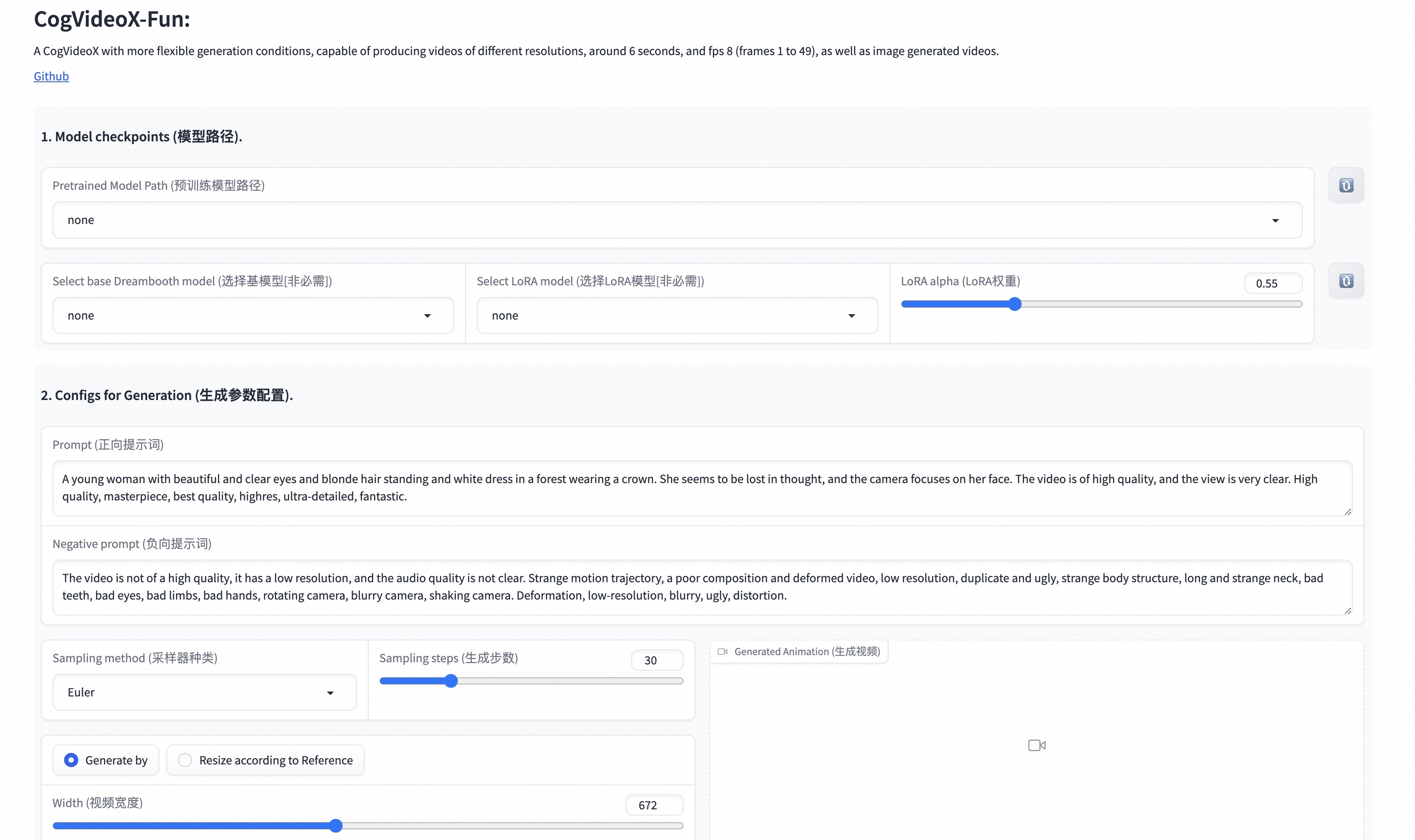
我们的ui界面如下:
# 快速启动
### 1. 云使用: AliyunDSW/Docker
#### a. 通过阿里云 DSW
DSW 有免费 GPU 时间,用户可申请一次,申请后3个月内有效。
阿里云在[Freetier](https://free.aliyun.com/?product=9602825&crowd=enterprise&spm=5176.28055625.J_5831864660.1.e939154aRgha4e&scm=20140722.M_9974135.P_110.MO_1806-ID_9974135-MID_9974135-CID_30683-ST_8512-V_1)提供免费GPU时间,获取并在阿里云PAI-DSW中使用,5分钟内即可启动CogVideoX-Fun。
[](https://gallery.pai-ml.com/#/preview/deepLearning/cv/cogvideox_fun)
#### b. 通过ComfyUI
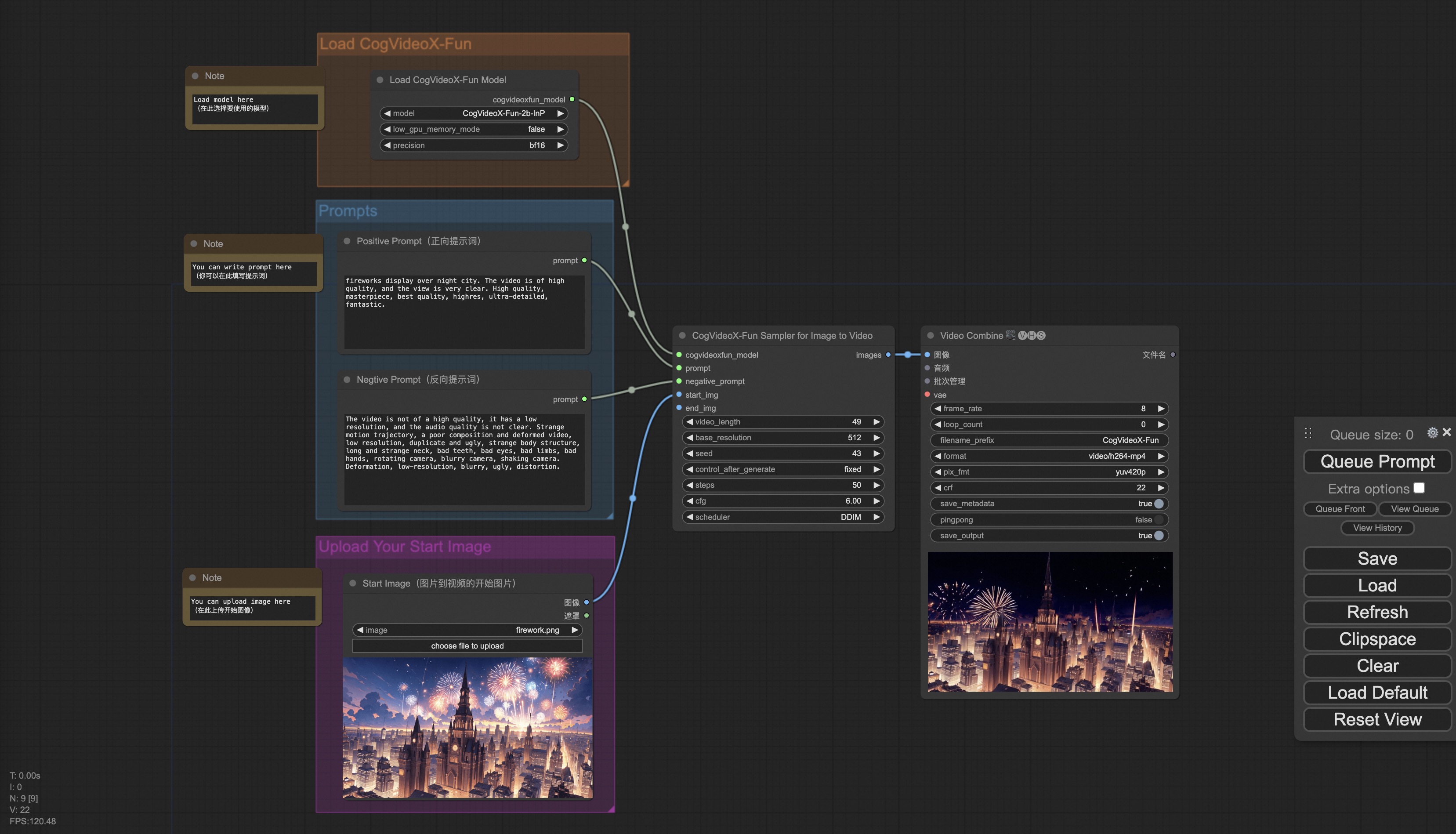
我们的ComfyUI界面如下,具体查看[ComfyUI README](comfyui/README.md)。
#### c. 通过docker
使用docker的情况下,请保证机器中已经正确安装显卡驱动与CUDA环境,然后以此执行以下命令:
```
# pull image
docker pull mybigpai-public-registry.cn-beijing.cr.aliyuncs.com/easycv/torch_cuda:cogvideox_fun
# enter image
docker run -it -p 7860:7860 --network host --gpus all --security-opt seccomp:unconfined --shm-size 200g mybigpai-public-registry.cn-beijing.cr.aliyuncs.com/easycv/torch_cuda:cogvideox_fun
# clone code
git clone https://github.com/aigc-apps/CogVideoX-Fun.git
# enter CogVideoX-Fun's dir
cd CogVideoX-Fun
# download weights
mkdir models/Diffusion_Transformer
mkdir models/Personalized_Model
wget https://pai-aigc-photog.oss-cn-hangzhou.aliyuncs.com/cogvideox_fun/Diffusion_Transformer/CogVideoX-Fun-V1.1-2b-InP.tar.gz -O models/Diffusion_Transformer/CogVideoX-Fun-V1.1-2b-InP.tar.gz
cd models/Diffusion_Transformer/
tar -xvf CogVideoX-Fun-V1.1-2b-InP.tar.gz
cd ../../
```
### 2. 本地安装: 环境检查/下载/安装
#### a. 环境检查
我们已验证CogVideoX-Fun可在以下环境中执行:
Windows 的详细信息:
- 操作系统 Windows 10
- python: python3.10 & python3.11
- pytorch: torch2.2.0
- CUDA: 11.8 & 12.1
- CUDNN: 8+
- GPU: Nvidia-3060 12G & Nvidia-3090 24G
Linux 的详细信息:
- 操作系统 Ubuntu 20.04, CentOS
- python: python3.10 & python3.11
- pytorch: torch2.2.0
- CUDA: 11.8 & 12.1
- CUDNN: 8+
- GPU:Nvidia-V100 16G & Nvidia-A10 24G & Nvidia-A100 40G & Nvidia-A100 80G
我们需要大约 60GB 的可用磁盘空间,请检查!
#### b. 权重放置
我们最好将[权重](#model-zoo)按照指定路径进行放置:
```
📦 models/
├── 📂 Diffusion_Transformer/
│ ├── 📂 CogVideoX-Fun-V1.1-2b-InP/
│ └── 📂 CogVideoX-Fun-V1.1-5b-InP/
├── 📂 Personalized_Model/
│ └── your trained trainformer model / your trained lora model (for UI load)
```
# 视频作品
所展示的结果都是图生视频获得。
### CogVideoX-Fun-V1.1-5B
Resolution-1024
Resolution-768
Resolution-512
### CogVideoX-Fun-V1.1-5B-Pose
|
Resolution-512
|
Resolution-768
|
Resolution-1024
|
|
|
|
|
### CogVideoX-Fun-V1.1-2B
Resolution-768
### CogVideoX-Fun-V1.1-2B-Pose
|
Resolution-512
|
Resolution-768
|
Resolution-1024
|
|
|
|
|
# 如何使用
1. 生成
#### a. 视频生成
##### i、运行python文件
- 步骤1:下载对应[权重](#model-zoo)放入models文件夹。
- 步骤2:在predict_t2v.py文件中修改prompt、neg_prompt、guidance_scale和seed。
- 步骤3:运行predict_t2v.py文件,等待生成结果,结果保存在samples/cogvideox-fun-videos-t2v文件夹中。
- 步骤4:如果想结合自己训练的其他backbone与Lora,则看情况修改predict_t2v.py中的predict_t2v.py和lora_path。
##### ii、通过ui界面
- 步骤1:下载对应[权重](#model-zoo)放入models文件夹。
- 步骤2:运行app.py文件,进入gradio页面。
- 步骤3:根据页面选择生成模型,填入prompt、neg_prompt、guidance_scale和seed等,点击生成,等待生成结果,结果保存在sample文件夹中。
##### iii、通过comfyui
具体查看[ComfyUI README](comfyui/README.md)。
### 2. 模型训练
一个完整的CogVideoX-Fun训练链路应该包括数据预处理和Video DiT训练。
a.数据预处理
我们给出了一个简单的demo通过图片数据训练lora模型,详情可以查看[wiki](https://github.com/aigc-apps/CogVideoX-Fun/wiki/Training-Lora)。
一个完整的长视频切分、清洗、描述的数据预处理链路可以参考video caption部分的[README](cogvideox/video_caption/README.md)进行。
如果期望训练一个文生图视频的生成模型,您需要以这种格式排列数据集。
```
📦 project/
├── 📂 datasets/
│ ├── 📂 internal_datasets/
│ ├── 📂 train/
│ │ ├── 📄 00000001.mp4
│ │ ├── 📄 00000002.jpg
│ │ └── 📄 .....
│ └── 📄 json_of_internal_datasets.json
```
json_of_internal_datasets.json是一个标准的json文件。json中的file_path可以被设置为相对路径,如下所示:
```json
[
{
"file_path": "train/00000001.mp4",
"text": "A group of young men in suits and sunglasses are walking down a city street.",
"type": "video"
},
{
"file_path": "train/00000002.jpg",
"text": "A group of young men in suits and sunglasses are walking down a city street.",
"type": "image"
},
.....
]
```
你也可以将路径设置为绝对路径:
```json
[
{
"file_path": "/mnt/data/videos/00000001.mp4",
"text": "A group of young men in suits and sunglasses are walking down a city street.",
"type": "video"
},
{
"file_path": "/mnt/data/train/00000001.jpg",
"text": "A group of young men in suits and sunglasses are walking down a city street.",
"type": "image"
},
.....
]
```
b. Video DiT训练
如果数据预处理时,数据的格式为相对路径,则进入scripts/train.sh进行如下设置。
```
export DATASET_NAME="datasets/internal_datasets/"
export DATASET_META_NAME="datasets/internal_datasets/json_of_internal_datasets.json"
...
train_data_format="normal"
```
如果数据的格式为绝对路径,则进入scripts/train.sh进行如下设置。
```
export DATASET_NAME=""
export DATASET_META_NAME="/mnt/data/json_of_internal_datasets.json"
```
最后运行scripts/train.sh。
```sh
sh scripts/train.sh
```
关于一些参数的设置细节,可以查看[Readme Train](scripts/README_TRAIN.md)与[Readme Lora](scripts/README_TRAIN_LORA.md)
# 模型地址
V1.1:
| 名称 | 存储空间 | Hugging Face | Model Scope | 描述 |
|--|--|--|--|--|
| CogVideoX-Fun-V1.1-2b-InP.tar.gz | 解压前 9.7 GB / 解压后 13.0 GB | [🤗Link](https://huggingface.co/alibaba-pai/CogVideoX-Fun-V1.1-2b-InP) | [😄Link](https://modelscope.cn/models/PAI/CogVideoX-Fun-V1.1-2b-InP) | 官方的图生视频权重。添加了Noise,运动幅度相比于V1.0更大。支持多分辨率(512,768,1024,1280)的视频预测,以49帧、每秒8帧进行训练 |
| CogVideoX-Fun-V1.1-5b-InP.tar.gz | 解压前 16.0GB / 解压后 20.0 GB | [🤗Link](https://huggingface.co/alibaba-pai/CogVideoX-Fun-V1.1-5b-InP) | [😄Link](https://modelscope.cn/models/PAI/CogVideoX-Fun-V1.1-5b-InP) | 官方的图生视频权重。添加了Noise,运动幅度相比于V1.0更大。支持多分辨率(512,768,1024,1280)的视频预测,以49帧、每秒8帧进行训练 |
| CogVideoX-Fun-V1.1-2b-Pose.tar.gz | 解压前 9.7 GB / 解压后 13.0 GB | [🤗Link](https://huggingface.co/alibaba-pai/CogVideoX-Fun-V1.1-2b-Pose) | [😄Link](https://modelscope.cn/models/PAI/CogVideoX-Fun-V1.1-2b-Pose) | 官方的姿态控制生视频权重。支持多分辨率(512,768,1024,1280)的视频预测,以49帧、每秒8帧进行训练 |
| CogVideoX-Fun-V1.1-5b-Pose.tar.gz | 解压前 16.0GB / 解压后 20.0 GB | [🤗Link](https://huggingface.co/alibaba-pai/CogVideoX-Fun-V1.1-5b-Pose) | [😄Link](https://modelscope.cn/models/PAI/CogVideoX-Fun-V1.1-5b-Pose) | 官方的姿态控制生视频权重。支持多分辨率(512,768,1024,1280)的视频预测,以49帧、每秒8帧进行训练 |
V1.0:
| 名称 | 存储空间 | Hugging Face | Model Scope | 描述 |
|--|--|--|--|--|
| CogVideoX-Fun-2b-InP.tar.gz | 解压前 9.7 GB / 解压后 13.0 GB | [🤗Link](https://huggingface.co/alibaba-pai/CogVideoX-Fun-2b-InP) | [😄Link](https://modelscope.cn/models/PAI/CogVideoX-Fun-2b-InP) | 官方的图生视频权重。支持多分辨率(512,768,1024,1280)的视频预测,以49帧、每秒8帧进行训练 |
| CogVideoX-Fun-5b-InP.tar.gz | 解压前 16.0GB / 解压后 20.0 GB | [🤗Link](https://huggingface.co/alibaba-pai/CogVideoX-Fun-5b-InP) | [😄Link](https://modelscope.cn/models/PAI/CogVideoX-Fun-5b-InP) | 官方的图生视频权重。支持多分辨率(512,768,1024,1280)的视频预测,以49帧、每秒8帧进行训练 |
# 未来计划
- 支持中文。
# 参考文献
- CogVideo: https://github.com/THUDM/CogVideo/
- EasyAnimate: https://github.com/aigc-apps/EasyAnimate
# 许可证
本项目采用 [Apache License (Version 2.0)](https://github.com/modelscope/modelscope/blob/master/LICENSE).
CogVideoX-2B 模型 (包括其对应的Transformers模块,VAE模块) 根据 [Apache 2.0 协议](LICENSE) 许可证发布。
CogVideoX-5B 模型(Transformer 模块)在[CogVideoX许可证](https://huggingface.co/THUDM/CogVideoX-5b/blob/main/LICENSE)下发布.