---
language:
- en
base_model:
- black-forest-labs/FLUX.1-dev
- Qwen/Qwen2-VL-7B-Instruct
library_name: diffusers
tags:
- flux
- qwen2vl
- stable-diffusion
- text-to-image
- image-to-image
- controlnet
pipeline_tag: text-to-image
inference: false
---
# Qwen2vl-Flux
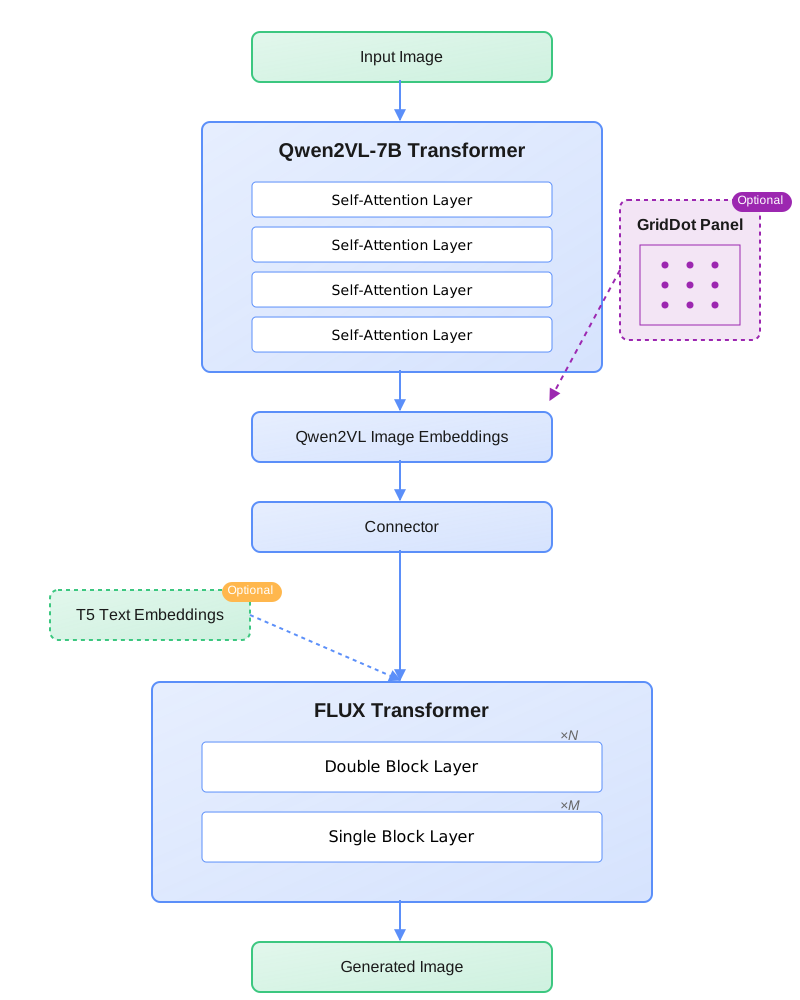
Qwen2vl-Flux is a state-of-the-art multimodal image generation model that enhances FLUX with Qwen2VL's vision-language understanding capabilities. This model excels at generating high-quality images based on both text prompts and visual references, offering superior multimodal understanding and control.
## Model Architecture
The model integrates Qwen2VL's vision-language capabilities into the FLUX framework, enabling more precise and context-aware image generation. Key components include:
- Vision-Language Understanding Module (Qwen2VL)
- Enhanced FLUX backbone
- Multi-mode Generation Pipeline
- Structural Control Integration
## Features
- **Enhanced Vision-Language Understanding**: Leverages Qwen2VL for superior multimodal comprehension
- **Multiple Generation Modes**: Supports variation, img2img, inpainting, and controlnet-guided generation
- **Structural Control**: Integrates depth estimation and line detection for precise structural guidance
- **Flexible Attention Mechanism**: Supports focused generation with spatial attention control
- **High-Resolution Output**: Supports various aspect ratios up to 1536x1024
## Generation Examples
### Image Variation
Create diverse variations while maintaining the essence of the original image:
### Image Blending
Seamlessly blend multiple images with intelligent style transfer:
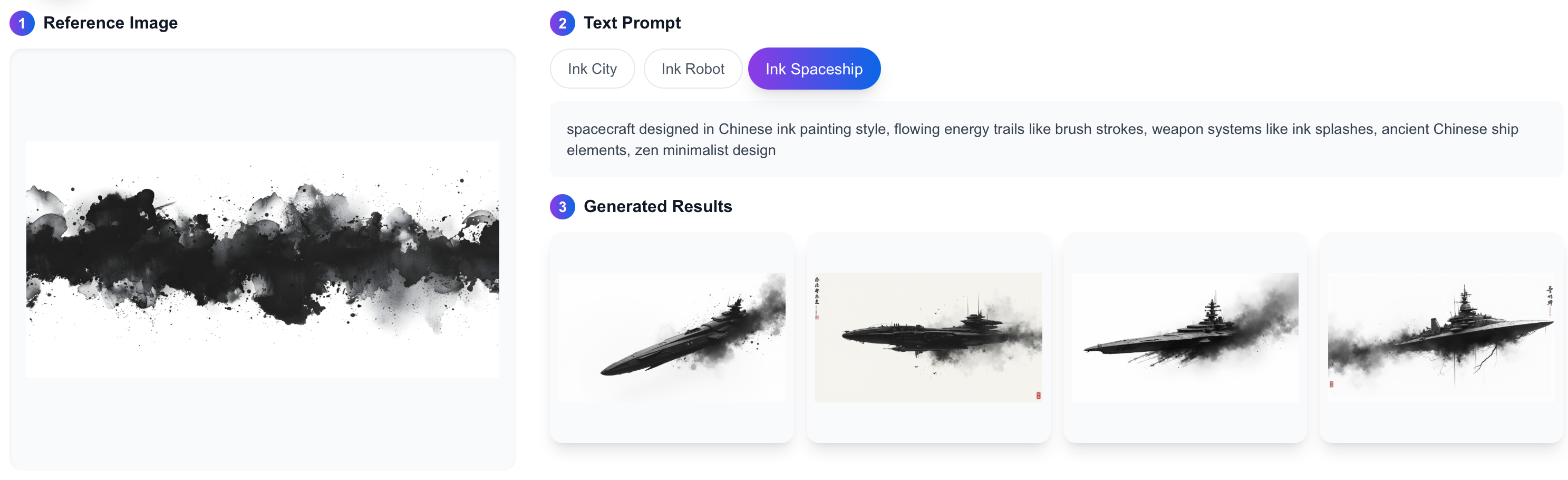
### Text-Guided Image Blending
Control image generation with textual prompts:
### Grid-Based Style Transfer
Apply fine-grained style control with grid attention:
## Usage
The inference code is available via our [GitHub repository](https://github.com/erwold/qwen2vl-flux) which provides comprehensive Python interfaces and examples.
### Installation
1. Clone the repository and install dependencies:
```bash
git clone https://github.com/erwold/qwen2vl-flux
cd qwen2vl-flux
pip install -r requirements.txt
```
2. Download model checkpoints from Hugging Face:
```python
from huggingface_hub import snapshot_download
snapshot_download("Djrango/Qwen2vl-Flux")
```
### Basic Examples
```python
from model import FluxModel
# Initialize model
model = FluxModel(device="cuda")
# Image Variation
outputs = model.generate(
input_image_a=input_image,
prompt="Your text prompt",
mode="variation"
)
# Image Blending
outputs = model.generate(
input_image_a=source_image,
input_image_b=reference_image,
mode="img2img",
denoise_strength=0.8
)
# Text-Guided Blending
outputs = model.generate(
input_image_a=input_image,
prompt="Transform into an oil painting style",
mode="variation",
guidance_scale=7.5
)
# Grid-Based Style Transfer
outputs = model.generate(
input_image_a=content_image,
input_image_b=style_image,
mode="controlnet",
line_mode=True,
depth_mode=True
)
```
## Technical Specifications
- **Framework**: PyTorch 2.4.1+
- **Base Models**:
- FLUX.1-dev
- Qwen2-VL-7B-Instruct
- **Memory Requirements**: 48GB+ VRAM
- **Supported Image Sizes**:
- 1024x1024 (1:1)
- 1344x768 (16:9)
- 768x1344 (9:16)
- 1536x640 (2.4:1)
- 896x1152 (3:4)
- 1152x896 (4:3)
## Citation
```bibtex
@misc{erwold-2024-qwen2vl-flux,
title={Qwen2VL-Flux: Unifying Image and Text Guidance for Controllable Image Generation},
author={Pengqi Lu},
year={2024},
url={https://github.com/erwold/qwen2vl-flux}
}
```
## License
- This model is a derivative work based on:
- FLUX.1 [dev] (Non-Commercial License)
- Qwen2-VL (Apache 2.0)
- As such, this model inherits the Non-Commercial License restrictions from FLUX.1 [dev]
- For commercial use, please contact the FLUX team
## Acknowledgments
- Based on the FLUX architecture
- Integrates Qwen2VL for vision-language understanding
- Thanks to the open-source communities of FLUX and Qwen