---
title: HunyuanDiT-v1.1-Diffusers-Distilled
canonical_url: "https://www.modelscope.cn/models/AI-ModelScope/HunyuanDiT-v1.1-Diffusers-Distilled"
md_url: "https://www.modelscope.cn/models/AI-ModelScope/HunyuanDiT-v1.1-Diffusers-Distilled.md"
repository: AI-ModelScope/HunyuanDiT-v1.1-Diffusers-Distilled
last_updated: 2024-11-06
license: other
pipeline_tag: text-to-image-synthesis
tasks:
- text-to-image-synthesis
parameters: 3.6B
tensor_type:
- F32
library_name:
- pytorch
- safetensors
- diffusers
frameworks:
- pytorch
language:
- en
downloads: 2895
stars: 4
---
# HunyuanDiT-v1.1-Diffusers-Distilled
> HunyuanDiT-v1.1-Diffusers-Distilled - AI-ModelScope 在 ModelScope 开源的模型。Hunyuan-DiT : A Powerful Multi-Resolution Diffusion Transformer with Fine-Grained Chinese Understanding 混元-DiT: 具有细粒度中文理解的多分辨率Diffusion Transformer
AI-ModelScope/HunyuanDiT-v1.1-Diffusers-Distilled 是 ModelScope 魔搭社区上的 3.6B 参数text-to-image-synthesis模型,采用 other 许可。
- **Repository**: AI-ModelScope/HunyuanDiT-v1.1-Diffusers-Distilled
- **License**: other
- **Tasks**: text-to-image-synthesis
- **Parameters**: 3.6B
- **Downloads**: 2895
- **Stars**: 4
- **Last updated**: 2024-11-06
Source: https://www.modelscope.cn/models/AI-ModelScope/HunyuanDiT-v1.1-Diffusers-Distilled
---

# Hunyuan-DiT : A Powerful Multi-Resolution Diffusion Transformer with Fine-Grained Chinese Understanding
# 混元-DiT: 具有细粒度中文理解的多分辨率Diffusion Transformer
[[Arxiv]](https://arxiv.org/abs/2405.08748) [[project page]](https://dit.hunyuan.tencent.com/) [[github]](https://github.com/Tencent/HunyuanDiT)
This repo contains the distilled Hunyuan-DiT in 🤗 [Diffusers](https://github.com/huggingface/diffusers) format.
It supports 25-step text-to-image generation.
## Dependency
Please install PyTorch first, following the instruction in [https://pytorch.org](https://pytorch.org)
Install the latest version of transformers with `pip`:
```
pip install --upgrade transformers
```
Then install the latest github version of 🤗 Diffusers with `pip`:
```
pip install git+https://github.com/huggingface/diffusers.git
```
## Example Usage with 🤗 Diffusers
```py
import torch
from diffusers import HunyuanDiTPipeline
pipe = HunyuanDiTPipeline.from_pretrained("Tencent-Hunyuan/HunyuanDiT-v1.1-Diffusers-Distilled", torch_dtype=torch.float16)
pipe.to("cuda")
# You may also use English prompt as HunyuanDiT supports both English and Chinese
# prompt = "An astronaut riding a horse"
prompt = "一个宇航员在骑马"
image = pipe(prompt).images[0]
```

## 📈 Comparisons
In order to comprehensively compare the generation capabilities of HunyuanDiT and other models, we constructed a 4-dimensional test set, including Text-Image Consistency, Excluding AI Artifacts, Subject Clarity, Aesthetic. More than 50 professional evaluators performs the evaluation.
| Model | Open Source | Text-Image Consistency (%) | Excluding AI Artifacts (%) | Subject Clarity (%) | Aesthetics (%) | Overall (%) |
| SDXL | ✔ | 64.3 | 60.6 | 91.1 | 76.3 | 42.7 |
| PixArt-α | ✔ | 68.3 | 60.9 | 93.2 | 77.5 | 45.5 |
| Playground 2.5 | ✔ | 71.9 | 70.8 | 94.9 | 83.3 | 54.3 |
| SD 3 | ✘ | 77.1 | 69.3 | 94.6 | 82.5 | 56.7 |
| MidJourney v6 | ✘ | 73.5 | 80.2 | 93.5 | 87.2 | 63.3 |
| DALL-E 3 | ✘ | 83.9 | 80.3 | 96.5 | 89.4 | 71.0 |
| Hunyuan-DiT | ✔ | 74.2 | 74.3 | 95.4 | 86.6 | 59.0 |
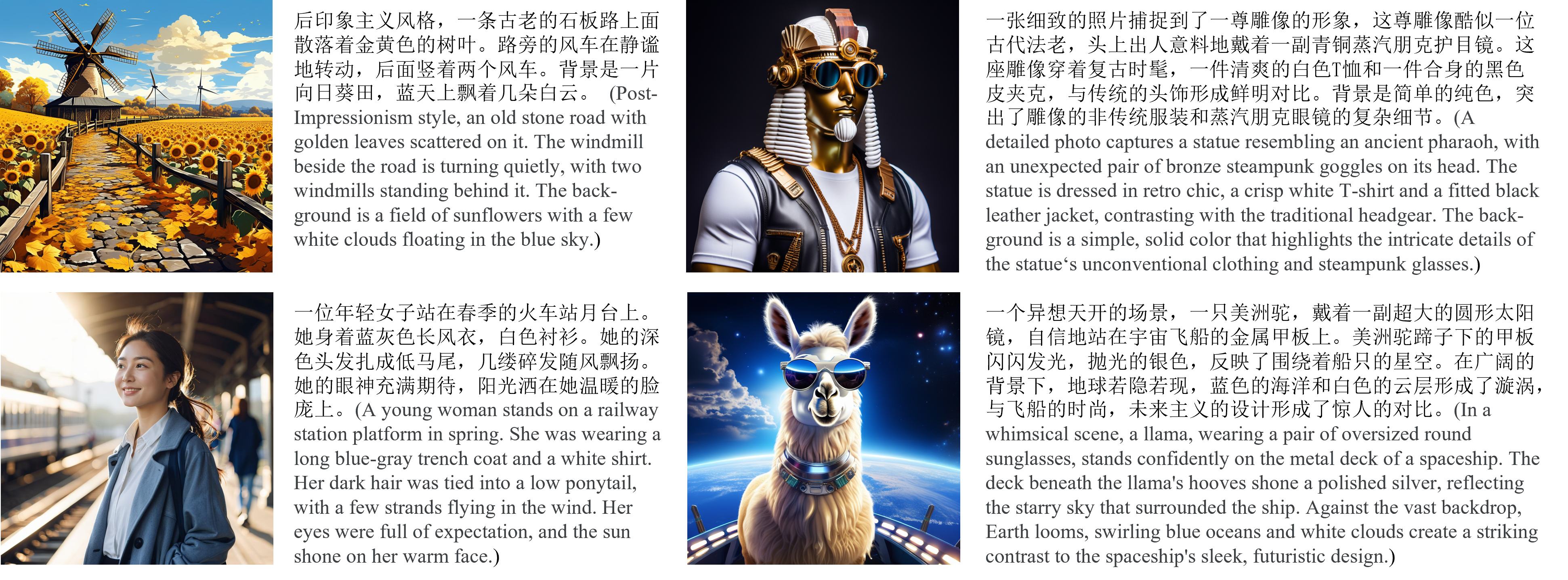
## 🎥 Visualization
* **Chinese Elements**

* **Long Text Input**
## 🔥🔥🔥 Tencent Hunyuan Bot
Welcome to [Tencent Hunyuan Bot](https://hunyuan.tencent.com/bot/chat), where you can explore our innovative products in multi-round conversation!